
How the neck traction device works
User Guide
Watch how to setup the devise, what to pay attention to when using it and the simple steps to get most out of it.
Getting Started
3 Steps
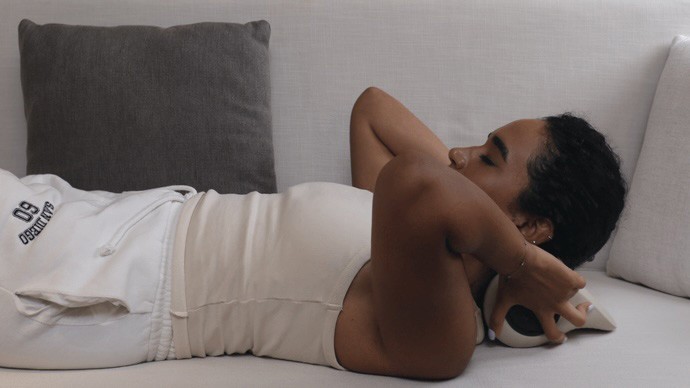
Turn it on, lie back, and let gravity do the work.
01
" result="vGlJON6hc-3360671954-shadow-outset-0-flood"/><feComposite in="vGlJON6hc-3360671954-shadow-outset-0-flood" in2="vGlJON6hc-3360671954-shadow-outset-0-blur" operator="in" result="vGlJON6hc-3360671954-shadow-outset-0"/></filter><path d="M 0 250 C 0 111.929 111.929 0 250 0 L 250 0 C 388.071 0 500 111.929 500 250 L 500 250 C 500 388.071 388.071 500 250 500 L 250 500 C 111.929 500 0 388.071 0 250 Z" id="vGlJON6hc-3360671954"/><filter filter-units="objectBoundingBox" height="102.1%" id="Mnj3KCU8e-3360671954-shadow-outset" width="101.7%" x="-0.8%" y="-1.0%"><feOffset dx="0" dy="1" in="SourceAlpha" result="Mnj3KCU8e-3360671954-shadow-outset-0-offset"/><feGaussianBlur in="Mnj3KCU8e-3360671954-shadow-outset-0-offset" result="Mnj3KCU8e-3360671954-shadow-outset-0-blur" stdDeviation="1"/><feFlood flood-color="rgba(0, 0, 0, 0.25)" result="Mnj3KCU8e-3360671954-shadow-outset-0-flood"/><feComposite in="Mnj3KCU8e-3360671954-shadow-outset-0-flood" in2="Mnj3KCU8e-3360671954-shadow-outset-0-blur" operator="in" result="Mnj3KCU8e-3360671954-shadow-outset-0"/></filter><path d="M 0 0 L 500 0 L 0 0 M 500 251 C 500 389.071 388.071 501 250 501 C 111.929 501 0 389.071 0 251 L 0 250 C 0 387.519 111.929 499 250 499 C 388.071 499 500 387.519 500 250 Z M 500 250 M 0 500 L 0 0 L 0 500 M 0 500 M 500 0 L 500 500 L 500 0" id="Mnj3KCU8e-3360671954"/><filter filter-units="objectBoundingBox" height="104.3%" id="whPIANmuI-3360671954-shadow-outset" width="103.2%" x="-1.6%" y="-2.2%"><feOffset dx="0" dy="1" in="SourceAlpha" result="whPIANmuI-3360671954-shadow-outset-0-offset"/><feGaussianBlur in="whPIANmuI-3360671954-shadow-outset-0-offset" result="whPIANmuI-3360671954-shadow-outset-0-blur" stdDeviation="1"/><feFlood flood-color="rgba(0, 0, 0, 0.25)" result="whPIANmuI-3360671954-shadow-outset-0-flood"/><feComposite in="whPIANmuI-3360671954-shadow-outset-0-flood" in2="whPIANmuI-3360671954-shadow-outset-0-blur" operator="in" result="whPIANmuI-3360671954-shadow-outset-0"/></filter><path d="M 208.48 10.678 C 225.507 23.309 238.733 38.867 247.593 58.004 C 254.486 72.89 258.041 88.591 258.85 104.949 C 259.992 128.014 255.622 149.98 244.778 170.362 C 226.415 204.875 197.601 226.087 159.926 235.675 C 144.664 239.559 129.2 240.401 113.651 238.373 C 87.615 234.977 64.375 224.964 44.319 207.894 C 22.969 189.722 8.981 166.939 3.234 139.524 C -5.343 98.613 2.969 61.537 30.196 29.318 C 39.253 18.599 50.343 10.138 62.352 2.968 C 68.889 -0.935 75.838 -1.071 82.377 3.054 C 88.427 6.87 91.1 12.759 90.666 19.803 C 90.263 26.334 87.124 31.394 81.399 34.818 C 66.486 43.737 54.982 55.924 47.054 71.377 C 31.088 102.502 35.708 141.882 58.318 168.596 C 74.207 187.369 94.411 198.54 118.726 201.467 C 146.04 204.754 170.317 196.85 190.931 178.732 C 208.488 163.301 218.878 143.663 220.911 120.332 C 223.898 86.058 210.998 58.693 183.176 38.416 C 181.128 36.923 178.945 35.616 176.832 34.212 C 168.729 28.827 165.963 18.07 170.536 9.75 C 175.278 1.125 185.681 -2.469 194.655 1.955 C 199.464 4.326 203.795 7.666 208.48 10.678 Z" id="whPIANmuI-3360671954" transform="translate(120.487 143.111)"/><filter filter-units="objectBoundingBox" height="108.5%" id="ujb7kaC4a-3360671954-shadow-outset" width="120.2%" x="-10.1%" y="-4.2%"><feOffset dx="0" dy="1" in="SourceAlpha" result="ujb7kaC4a-3360671954-shadow-outset-0-offset"/><feGaussianBlur in="ujb7kaC4a-3360671954-shadow-outset-0-offset" result="ujb7kaC4a-3360671954-shadow-outset-0-blur" stdDeviation="1"/><feFlood flood-color="rgba(0, 0, 0, 0.25)" result="ujb7kaC4a-3360671954-shadow-outset-0-flood"/><feComposite in="ujb7kaC4a-3360671954-shadow-outset-0-flood" in2="ujb7kaC4a-3360671954-shadow-outset-0-blur" operator="in" result="ujb7kaC4a-3360671954-shadow-outset-0"/></filter><path d="M 19.049 0.008 C 30.019 -0.261 37.282 6.093 38.502 16.783 C 40.785 36.795 42.147 56.867 41.219 77.002 C 40.757 87.025 39.667 97.041 38.392 107 C 37.231 116.063 29.753 122.333 20.84 122.453 C 12.145 122.569 4.565 116.126 3.189 107.082 C 0.104 86.801 -0.673 66.391 0.557 45.93 C 1.141 36.228 2.143 26.548 3.122 16.875 C 4.069 7.515 10.473 0.786 19.049 0.008 Z" id="ujb7kaC4a-3360671954" transform="translate(229.244 117.449)"/></defs><mask height="102.1%" id="vGlJON6hc-3360671954-shadow-mask" width="101.7%" x="-0.8%" y="-1.0%"><rect fill="white" height="100%" width="100%"/><use fill="black" href="%23vGlJON6hc-3360671954"/></mask><g filter="url(%23vGlJON6hc-3360671954-shadow-outset)" mask="url(%23vGlJON6hc-3360671954-shadow-mask)"><use fill="black" href="%23vGlJON6hc-3360671954" stroke-opacity="0" stroke-width="0" stroke="black"/></g><use fill="rgb(239, 235, 231)" height="500px" href="%23vGlJON6hc-3360671954" id="vGlJON6hc" width="500px"/><mask height="102.1%" id="Mnj3KCU8e-3360671954-shadow-mask" width="101.7%" x="-0.8%" y="-1.0%"><rect fill="white" height="100%" width="100%"/><use fill="black" href="%23Mnj3KCU8e-3360671954"/></mask><g filter="url(%23Mnj3KCU8e-3360671954-shadow-outset)" mask="url(%23Mnj3KCU8e-3360671954-shadow-mask)"><use fill="black" href="%23Mnj3KCU8e-3360671954" stroke-opacity="0" stroke-width="0" stroke="black"/></g><use fill="rgba(21, 19, 14, 0.4)" height="501px" href="%23Mnj3KCU8e-3360671954" id="Mnj3KCU8e" width="500px"/><mask height="104.3%" id="whPIANmuI-3360671954-shadow-mask" width="103.2%" x="-1.6%" y="-2.2%"><rect fill="white" height="100%" width="100%"/><use fill="black" href="%23whPIANmuI-3360671954"/></mask><g filter="url(%23whPIANmuI-3360671954-shadow-outset)" mask="url(%23whPIANmuI-3360671954-shadow-mask)"><use fill="black" href="%23whPIANmuI-3360671954" stroke-opacity="0" stroke-width="0" stroke="black"/></g><use fill="rgb(181, 126, 108)" height="239.43983078957916px" href="%23whPIANmuI-3360671954" id="whPIANmuI" width="259.02680591880176px"/><mask height="108.5%" id="ujb7kaC4a-3360671954-shadow-mask" width="120.2%" x="-10.1%" y="-4.2%"><rect fill="white" height="100%" width="100%"/><use fill="black" href="%23ujb7kaC4a-3360671954"/></mask><g filter="url(%23ujb7kaC4a-3360671954-shadow-outset)" mask="url(%23ujb7kaC4a-3360671954-shadow-mask)"><use fill="black" href="%23ujb7kaC4a-3360671954" stroke-opacity="0" stroke-width="0" stroke="black"/></g><use fill="rgb(181, 126, 108)" height="122.4547549379502px" href="%23ujb7kaC4a-3360671954" id="ujb7kaC4a" width="41.513599768049914px"/></svg>)
Get started.
Place the device on a flat surface. Rest your neck into the cradle. Your body weight and gravity do the rest to decompress your spine.
02
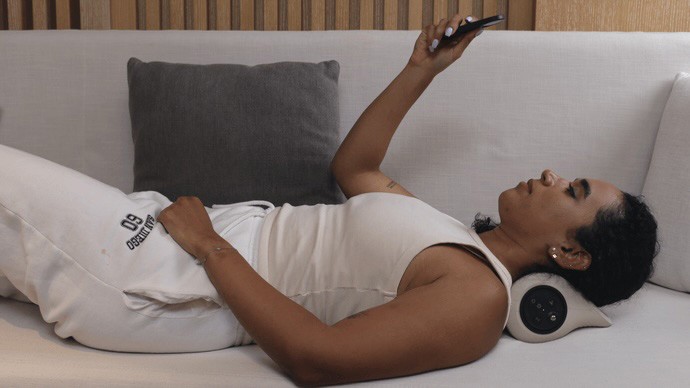
Adjust settings.
All modes are optional. Their work together or on their own. Use gentle heat, Red light to help muscle recovery, and rhythmic comfort pulses to massage your muscles.
" height="500px" id="SMAgblMJ2" width="500px"/><path d="M 0 0 L 500 0 L 0 0 M 500 251 C 500 389.071 388.071 501 250 501 C 111.929 501 0 389.071 0 251 L 0 250 C 0 387.519 111.929 499 250 499 C 388.071 499 500 387.519 500 250 Z M 500 250 M 0 500 L 0 0 L 0 500 M 0 500 M 500 0 L 500 500 L 500 0" fill="rgba(21, 19, 14, 0.4)" height="501px" id="c_Ks26Pck" width="500px"/><path d="M 148.95 157.795 C 164.345 170.567 172.018 187.357 175.614 206.355 C 177.65 217.107 178.407 227.881 175.65 238.649 C 171.738 253.931 158.247 264.8 142.403 264.866 C 106.644 265.014 70.876 265.356 35.125 264.785 C 13.354 264.437 1.336 246.634 0.449 231.142 C -0.593 212.962 2.566 195.914 10.639 179.695 C 15.82 169.29 23.79 161.268 32.724 154.095 C 36.238 151.274 39.836 148.558 43.325 145.708 C 45.217 144.162 47.065 142.533 48.752 140.768 C 54.468 134.786 54.417 129.51 48.492 123.664 C 43.881 119.115 38.545 115.416 33.479 111.408 C 22.67 102.857 13.294 93.153 7.621 80.334 C 3.664 71.39 1.529 62.024 0.593 52.306 C -0.267 43.385 -0.447 34.533 1.825 25.789 C 5.817 10.422 19.081 0.063 34.985 0.041 C 70.55 -0.01 106.115 -0.017 141.681 0.044 C 161.092 0.078 175.84 14.815 176.946 34.165 C 177.631 46.138 176.549 57.786 173.567 69.313 C 169.441 85.263 160.384 97.974 147.668 108.223 C 142.483 112.402 137.26 116.533 132.078 120.716 C 130.937 121.636 129.846 122.631 128.819 123.677 C 122.378 130.237 122.368 134.617 128.839 141.248 C 134.887 147.446 142.379 151.9 148.95 157.795 Z M 154.049 24.243 C 150.735 21.128 146.734 19.802 142.26 19.8 C 106.401 19.788 70.542 19.771 34.683 19.803 C 26.54 19.811 20.52 24.635 19.282 32.727 C 17.574 43.891 18.595 54.965 21.779 65.807 C 25.649 78.982 34.237 88.667 44.815 96.904 C 51.375 102.014 58.192 106.819 63.74 113.138 C 73.944 124.761 74.157 139.503 64.19 151.337 C 59.412 157.01 53.477 161.38 47.636 165.813 C 36.165 174.519 26.705 184.644 22.385 198.826 C 19.472 208.389 18.406 218.123 18.612 228.085 C 18.834 238.84 25.091 245.2 35.909 245.203 C 71.082 245.213 106.256 245.206 141.429 245.182 C 151.886 245.175 158.657 238.324 158.835 227.864 C 158.932 222.166 158.504 216.527 157.606 210.914 C 154.988 194.556 148.161 180.554 134.857 170.144 C 127.846 164.658 120.451 159.625 114.387 153.004 C 108 146.03 104.407 138.095 105.895 128.405 C 107.001 121.2 110.847 115.52 115.9 110.532 C 121.564 104.939 128.001 100.262 134.288 95.441 C 153.214 80.929 159.69 61.179 158.691 38.271 C 158.479 33.41 157.895 28.452 154.049 24.243 Z" fill="rgb(181, 126, 108)" height="265.10282988821973px" id="IxLNL9ses" transform="translate(161.279 117.448)" width="177.44128029976648px"/><path d="M 93.649 146.264 C 94.608 151.165 95.256 155.898 95.271 160.69 C 95.3 169.789 90.977 175.648 83.649 176.639 C 80.646 177.045 77.638 177.297 74.605 177.287 C 56.614 177.231 38.623 177.245 20.632 177.262 C 17.042 177.265 13.471 177.025 9.959 176.107 C 3.492 174.418 0.038 169.341 0.001 161.208 C -0.084 142.529 6.159 127.558 17.886 115.923 C 23.334 110.517 28.951 105.376 33.919 99.258 C 45.919 84.478 46.112 63.705 34.365 48.602 C 30.051 43.055 25.141 38.402 20.176 33.812 C 15.132 29.15 10.363 24.127 6.714 17.704 C 6.125 16.667 5.559 15.579 5.149 14.425 C 3.003 8.384 4.834 3.26 9.926 1.152 C 15.161 -1.015 20.293 0.203 25.376 2.101 C 30.319 3.948 34.92 6.99 40.007 8.356 C 47.901 10.477 55.632 9.908 63.215 6.468 C 68.732 3.965 74.187 1.206 80.108 0.416 C 82.887 0.045 85.509 0.715 87.85 2.585 C 91.151 5.222 91.965 10.075 89.93 14.78 C 87.259 20.955 83.266 25.696 78.874 29.993 C 74.08 34.684 69.132 39.161 64.545 44.141 C 56.418 52.963 51.316 63.683 52.342 77.586 C 53.082 87.623 57.457 95.358 63.373 101.828 C 68.009 106.897 72.868 111.661 77.699 116.452 C 85.56 124.249 91.055 133.927 93.649 146.264 Z" fill="rgb(181, 126, 108)" height="177.28778526089616px" id="TcMEuUlTM" transform="translate(201.873 175.44)" width="95.27100155229337px"/></svg>)
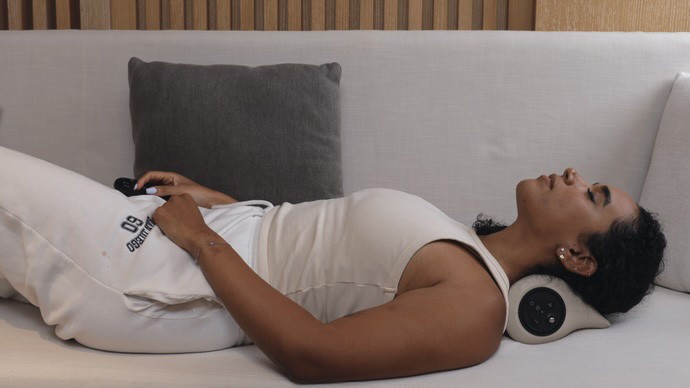
Set resting time.
Choose 10, 20, or 30 minutes. The device ramps down gently when your session ends.
Let Gravity Naturally Stretch And Relief Your Spine
Four angles. One is yours.
Adjust the traction depth to match how your neck feels today — from barely-there to deep release.
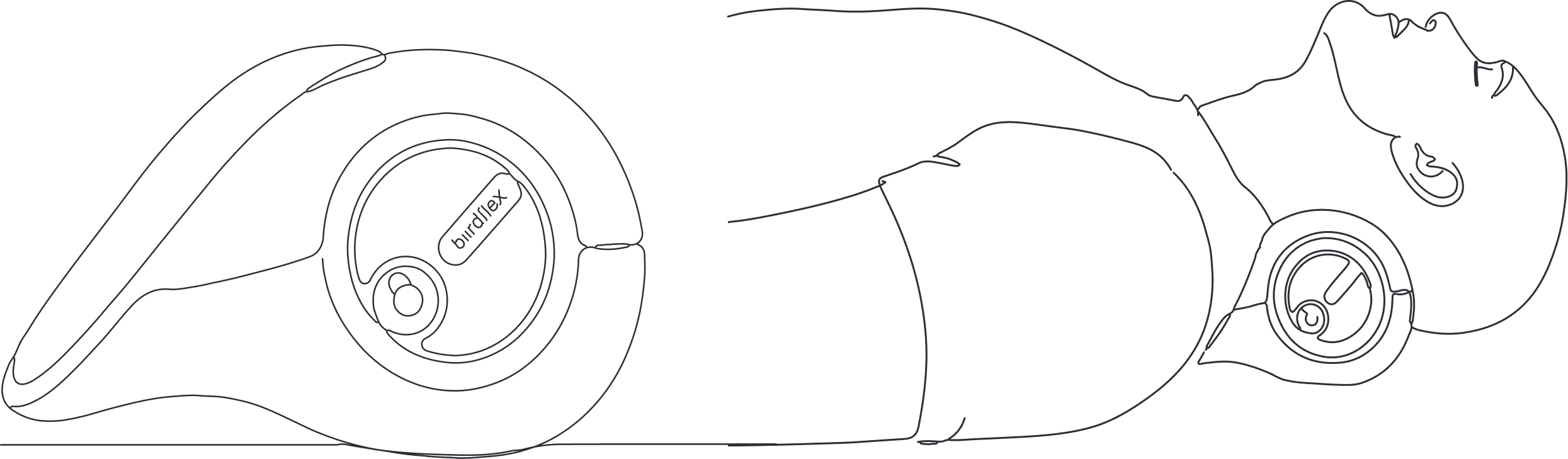
Side 1: Reset
37.6° elevation
Gently lifts the head to support the mid-to-lower neck. Designed to encourage better posture after long hours at a desk.
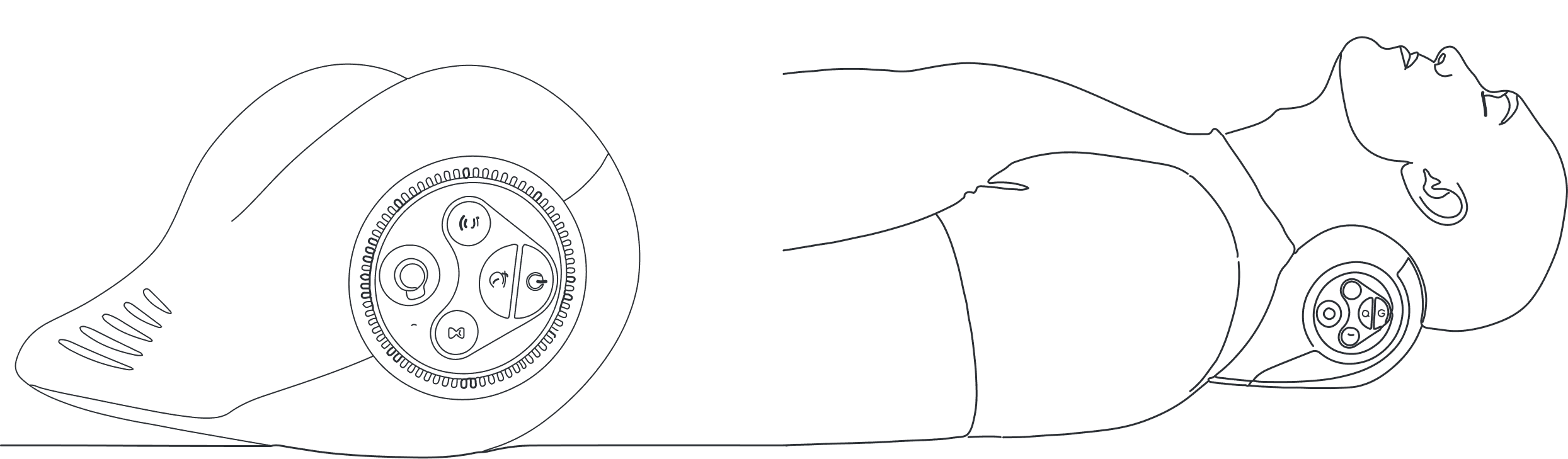
Side 2: Release
52.4° recline
Lets the head sink back naturally to stretch the upper neck. Helps ease tension where screen fatigue builds most. Best in 5–15 min sessions.
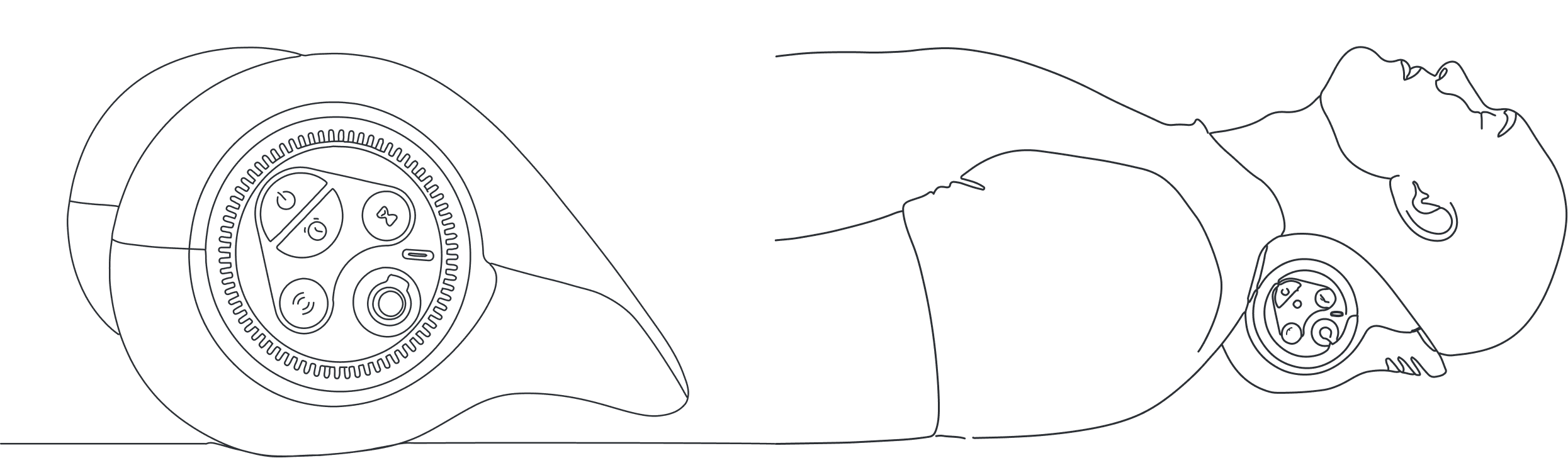
Side 3: Rest
47° recline
The gentlest option. A soft, gradual stretch across the mid-neck. Ideal for first-time users or as part of a daily wind-down — pairs beautifully with heat or red light.
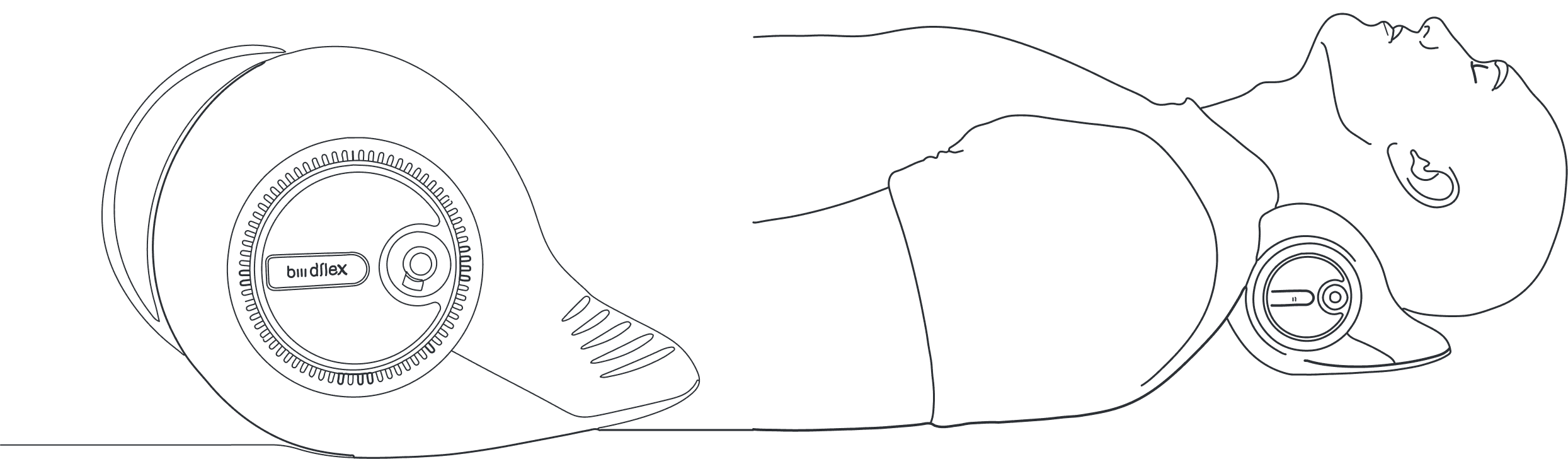
Side 4: Restore
43.1° elevation
A subtle lift that cradles the mid-cervical area. Built for the end of a long day — soothing enough to become your nightly ritual.
FAQ
Common questions.
What's the difference between Essential and Lumina?
Who is Biirdflex for?
Who is it NOT for?
What does it actually feel like?
Can I use it on my couch? In bed?
How warm does it get?
What are the comfort pulses?
What does the red light do?
How long is a session?
How often should I use it?
How long does the battery last?

Gentle relief that works while you rest.
Copyright: © 2026 Biirdflex.
All rights reserved.